---
title: ¿Cómo cancelar una reserva?
description: "Si por algún motivo no podrás asistir a tu clase, puedes cancelar tu reserva fácilmente desde la app. Este proceso aplica a todas las versiones de la app: Members, GO y personalizadas. Aquí te mostram"
---
[Ir directamente al contenido](https://help.boxmagicapp.com/es/cómo-cancelar-una-reserva#main-content)
Español
Traducciones de Mostrar submenú de
![isotipo color.png\]](https://help.boxmagicapp.com/hs-fs/hubfs/isotipo%20color.png?height=40&name=isotipo%20color.png)
- [Default HubSpot Blog](https://6338058.hs-sites.com/blog)
Abrir navegación principal
Cerrar navegación principal
- [Default HubSpot Blog](https://6338058.hs-sites.com/blog)
- Español
Traducciones de Mostrar submenú de
¿Cómo podemos ayudarte?
- No hay sugerencias porque el campo de búsqueda está vacío.
1. [Centro de ayuda](https://help.boxmagicapp.com/es?hsLang=es)
2. [Guía para ALUMNOS](https://help.boxmagicapp.com/es/gu%C3%ADa-para-alumnos?hsLang=es)
# ¿Cómo cancelar una reserva?
Si por algún motivo no podrás asistir a tu clase, puedes cancelar tu reserva fácilmente desde la app.
Este proceso aplica a **todas las versiones de la app**: Members, GO y personalizadas.
Aquí te mostramos cómo hacerlo:
---
### 🔹 Paso 1: Ingresa a la app
Abre la app desde tu celular con tu cuenta activa.
---
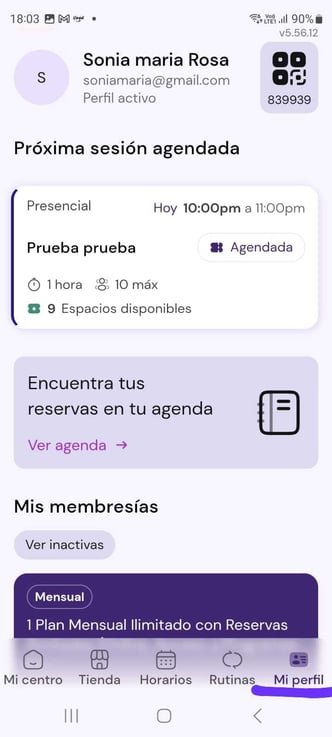
### 🔹 Paso 2: Ingresa a la sección **Mi perfil**
Desde el menú inferior, selecciona la opción **“Mi perfil”**.
Allí verás tu próxima clase agendada.
---
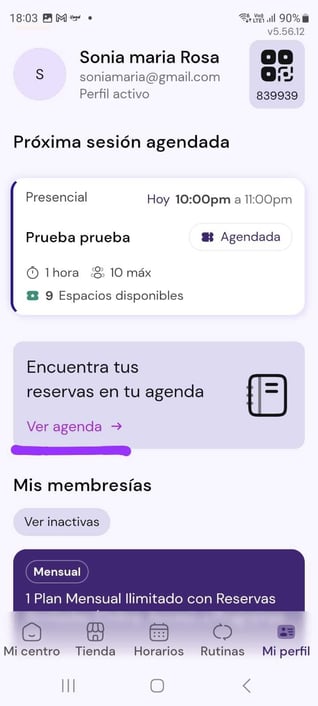
### 🔹 Paso 3: Haz clic en **“Ver agenda”**
Esto te llevará a la lista detallada de tus reservas activas, pasadas y futuras.
---
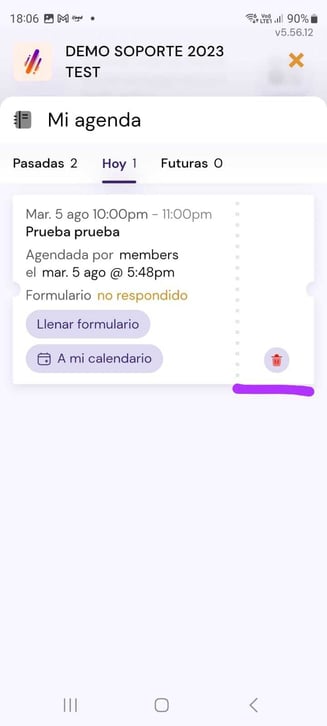
### 🔹 Paso 4: Toca el ícono de eliminar
Ubica la clase que deseas cancelar y presiona el ícono del basurero 🗑️.
---
### 🔹 Paso 5: Confirma la eliminación
Se abrirá una ventana de confirmación. Presiona el botón **“Eliminar reserva”**.
.jpeg?width=328&height=729&name=WhatsApp%20Image%202025-08-05%20at%2018.06.59%20(3).jpeg)
---
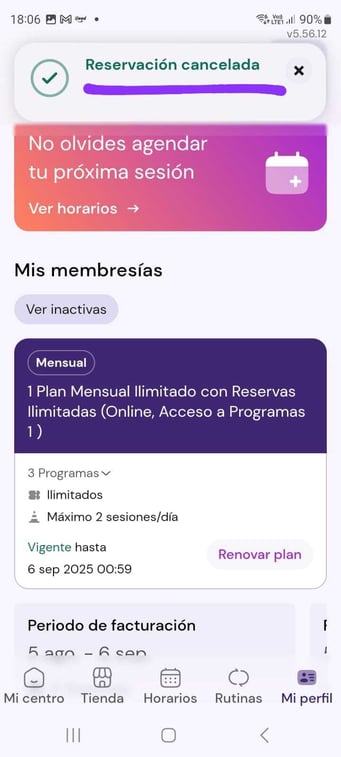
### 🔹 Paso 6: ¡Listo!
Verás el mensaje de confirmación **“Reservación cancelada”** y podrás agendar otra clase si lo deseas.
---
#### 🧠 Ten en cuenta:
- Algunas clases solo se pueden cancelar con cierta cantidad de horas de anticipación (según la política de tu centro).
- Si no aparece la opción de cancelar, puede deberse a que ya estás fuera del plazo permitido.
---
#### 🛠 ¿Necesitas ayuda?
Si tienes problemas para cancelar una clase o no ves la opción disponible, **contacta directamente con tu centro deportivo**.
Ellos podrán ayudarte en caso de:
- Errores en la visualización
- Problemas con el plan activo
- Fallas técnicas en la app
- [Primeros pasos](https://help.boxmagicapp.com/es/primeros-pasos?hsLang=es)
- [BoxMagic Tour para Administradores](https://help.boxmagicapp.com/es/boxmagic-tour-para-administradores?hsLang=es#main-content)
- [Marketing](https://help.boxmagicapp.com/es/boxmagic-tour-para-administradores?hsLang=es#marketing)
- [Clientes](https://help.boxmagicapp.com/es/boxmagic-tour-para-administradores?hsLang=es#clientes)
- [Mi Centro](https://help.boxmagicapp.com/es/boxmagic-tour-para-administradores?hsLang=es#mi-centro)
- [Inicio - Panel Principal](https://help.boxmagicapp.com/es/boxmagic-tour-para-administradores?hsLang=es#inicio-panel-principal)
- [Administración](https://help.boxmagicapp.com/es/boxmagic-tour-para-administradores?hsLang=es#administraci%C3%B3n)
- [Plugins](https://help.boxmagicapp.com/es/boxmagic-tour-para-administradores?hsLang=es#plugins)
- [Guía para ALUMNOS](https://help.boxmagicapp.com/es/gu%C3%ADa-para-alumnos?hsLang=es)
- [Control de gastos](https://help.boxmagicapp.com/es/control-de-gastos?hsLang=es#main-content)
- [Gastos operacionales Opex](https://help.boxmagicapp.com/es/control-de-gastos?hsLang=es#gastos-operacionales-opex)
- [Gastos en capital o Opex](https://help.boxmagicapp.com/es/control-de-gastos?hsLang=es#gastos-en-capital-o-opex)
- [Plugins y tips Avanzados](https://help.boxmagicapp.com/es/plugins-y-tips-avanzados?hsLang=es)
- [Actualizaciones](https://help.boxmagicapp.com/es/actualizaciones?hsLang=es)
- [Legal](https://help.boxmagicapp.com/es/legal?hsLang=es)
- [Default HubSpot Blog](https://6338058.hs-sites.com/blog)
[](http://www.boxmagicapp.com)
Centro de ayuda
Copyright © 2026, Boxmagic