---
title: Cómo puedo desactivar y archivar mis horarios?
description: Cómo desactivar y archivar clases?
---
[Ir directamente al contenido](https://help.boxmagicapp.com/es/cómo-puedo-desactivar-mis-horários#main-content)
Español
Traducciones de Mostrar submenú de
![isotipo color.png\]](https://help.boxmagicapp.com/hs-fs/hubfs/isotipo%20color.png?height=40&name=isotipo%20color.png)
- [Default HubSpot Blog](https://6338058.hs-sites.com/blog)
Abrir navegación principal
Cerrar navegación principal
- [Default HubSpot Blog](https://6338058.hs-sites.com/blog)
- Español
Traducciones de Mostrar submenú de
¿Cómo podemos ayudarte?
- No hay sugerencias porque el campo de búsqueda está vacío.
1. [Centro de ayuda](https://help.boxmagicapp.com/es?hsLang=es)
2. [BoxMagic Tour para Administradores](https://help.boxmagicapp.com/es/boxmagic-tour-para-administradores?hsLang=es)
3. [Mi Centro](https://help.boxmagicapp.com/es/boxmagic-tour-para-administradores?hsLang=es#mi-centro)
# Cómo puedo desactivar y archivar mis horarios?
### 1. Desactivar una clase
Esa funcionalidad permite desactivar clases que ya no existen o que no ocurrirá en la semana por algun motivo. Desactivando una clase, los alumnos ya no pueden visualizarla a traves de la app ni reservarla.
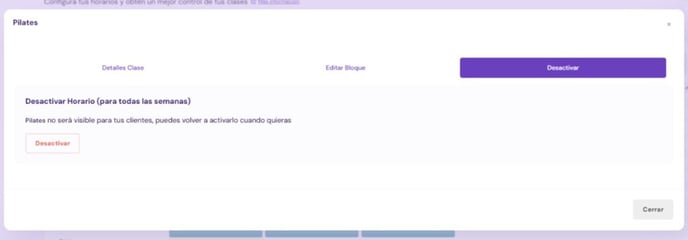
Para desactivar un horario especifico, debes ingresar en la sección ''Mi centro''/ ''Horarios'' y selecionar el horario que deseas desactivar. Se abrirá un recuadro y debes hacer clic en ''Desactivar'' en el menu arriba y lugo aprietar ''Desactivar'' en rojo.
### Como puedo visualizar las clases desactivadas?
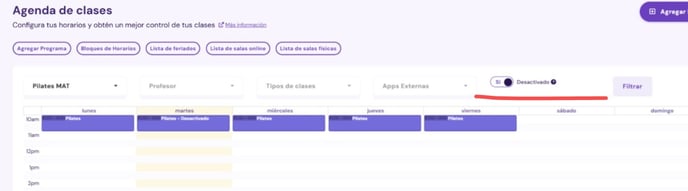
En la misma sección de horarios, cuando habilites el switch ''Desactivado'' y aprietes ''Filtrar'', aparecerán todas las clases que están desactivadas:
### 2. Archivar una clase **IMPORTANTE: ANTES DE ARCHIVAR UNA CLASE, DEBES SIEMPRE DESACTIVARLA. SINO LA CLASE SEGUIRÁ APARECIENDO ACTIVA PARA SUS ALUMNOS.**
Si deseas que el horario no aparezca más en los horarios desactivados, es posible archivar la clase. Para archivala es solo aprietar la clase correspondiente y luego ''archivar'':

Por esa misma ruta, también puedes re-activar una clase aprietando ''Re-activar''.
### 3. Desactivar y archivar bloques de horarios
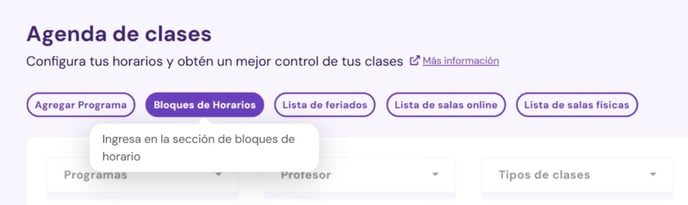
Para desactivar y archivar bloques de horarios, aprieta en ''Mi centro''/ ''Horarios''/ 'Bloques de horarios'':
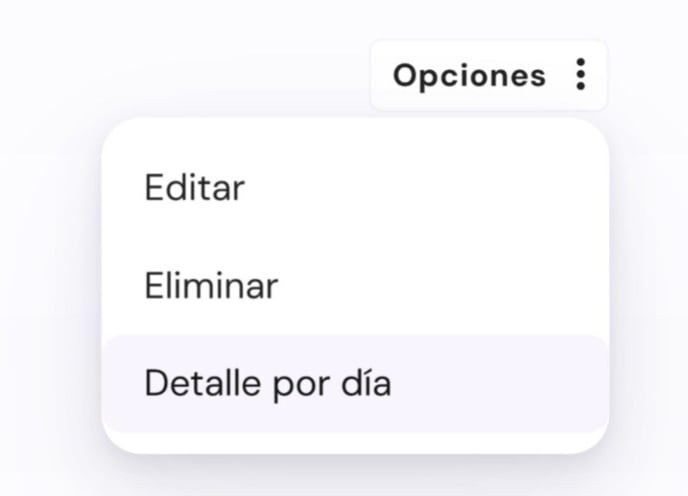
Enseguida, encontres el bloque que deseas desactivar, va en ''Opciones'' y luego ''Detalle por día'':
### 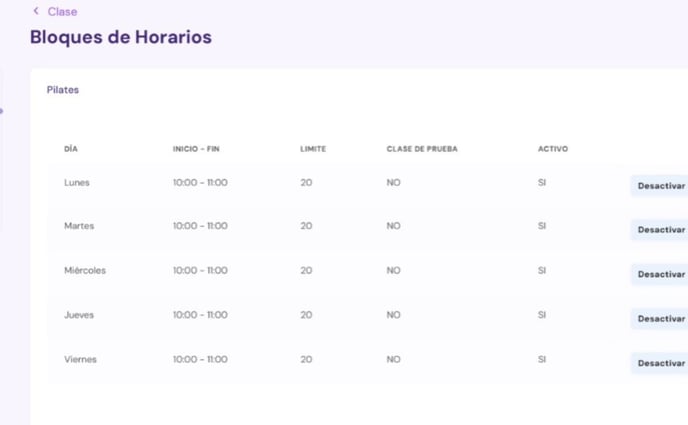
Para desactivar, aprieta ''Desactivar'' en cada uno de los horarios. Enseguida, acepte la opción de desactivar la clase y luego ''Guardar'':
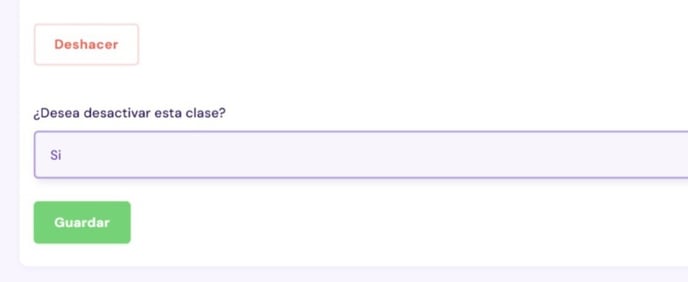
**IMPORTANTE: ANTES DE ARCHIVAR UNA CLASE, DEBES SIEMPRE DESACTIVARLA. SINO LA CLASE SEGUIRÁ APARECIENDO ACTIVA PARA SUS ALUMNOS.**
- [Primeros pasos](https://help.boxmagicapp.com/es/primeros-pasos?hsLang=es)
- [BoxMagic Tour para Administradores](https://help.boxmagicapp.com/es/boxmagic-tour-para-administradores?hsLang=es#main-content)
- [Marketing](https://help.boxmagicapp.com/es/boxmagic-tour-para-administradores?hsLang=es#marketing)
- [Clientes](https://help.boxmagicapp.com/es/boxmagic-tour-para-administradores?hsLang=es#clientes)
- [Mi Centro](https://help.boxmagicapp.com/es/boxmagic-tour-para-administradores?hsLang=es#mi-centro)
- [Inicio - Panel Principal](https://help.boxmagicapp.com/es/boxmagic-tour-para-administradores?hsLang=es#inicio-panel-principal)
- [Administración](https://help.boxmagicapp.com/es/boxmagic-tour-para-administradores?hsLang=es#administraci%C3%B3n)
- [Plugins](https://help.boxmagicapp.com/es/boxmagic-tour-para-administradores?hsLang=es#plugins)
- [Guía para ALUMNOS](https://help.boxmagicapp.com/es/gu%C3%ADa-para-alumnos?hsLang=es)
- [Control de gastos](https://help.boxmagicapp.com/es/control-de-gastos?hsLang=es#main-content)
- [Gastos operacionales Opex](https://help.boxmagicapp.com/es/control-de-gastos?hsLang=es#gastos-operacionales-opex)
- [Gastos en capital o Opex](https://help.boxmagicapp.com/es/control-de-gastos?hsLang=es#gastos-en-capital-o-opex)
- [Plugins y tips Avanzados](https://help.boxmagicapp.com/es/plugins-y-tips-avanzados?hsLang=es)
- [Actualizaciones](https://help.boxmagicapp.com/es/actualizaciones?hsLang=es)
- [Legal](https://help.boxmagicapp.com/es/legal?hsLang=es)
- [Default HubSpot Blog](https://6338058.hs-sites.com/blog)
[](http://www.boxmagicapp.com)
Centro de ayuda
Copyright © 2026, Boxmagic